


Download XMPlay – Free Fast MP3 Player, Winamp Alternative, Portable Music App
Overview
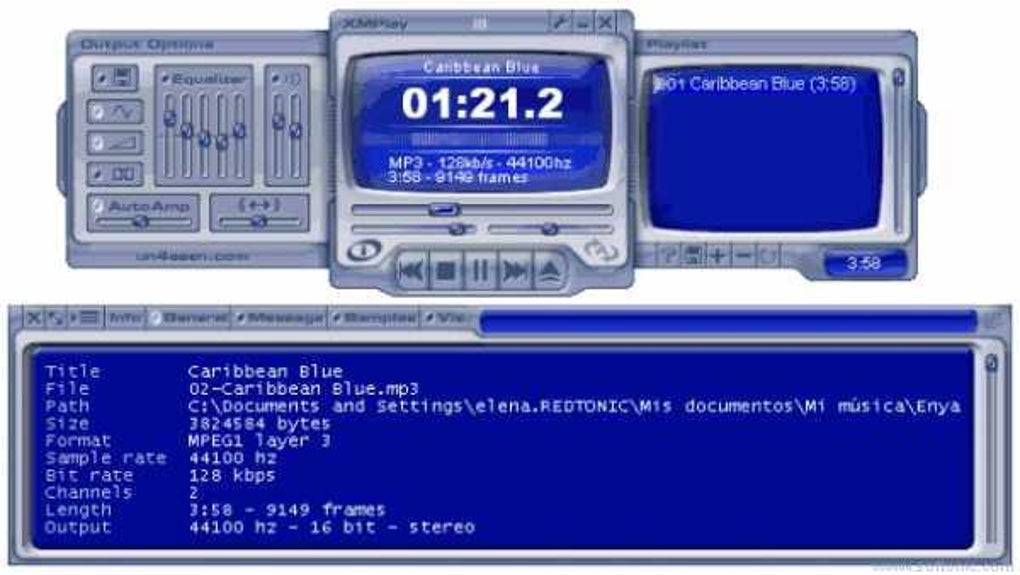
XMPlay is a lightweight, portable music player that positions itself as a worthy alternative to the classic Winamp experience. Built for users who value speed, simplicity, and a no‑install footprint, XMPlay lets you unzip the program into any folder and start playing instantly. Despite its modest size, the player supports a surprisingly broad range of audio formats—including MP3, WAV, FLAC, OGG, and even internet streams—while also handling CD tracks and playlists.
What sets XMPlay apart is its heavy reliance on keyboard shortcuts, allowing power users to control playback without ever leaving the keyboard. The interface can be toggled between two size modes and is skin‑compatible, giving a touch of personalization without bloating the core. While it lacks built‑in video support and some high‑end audio processing features, XMPlay shines as a fast, free, and secure option for anyone who wants a dedicated MP3 player without the overhead of larger suites.
If you’re looking for a tool that runs on Windows, consumes minimal resources, and lets you stay focused on your work while the music plays in the background, XMPlay is worth a try.
Key Features & Customization Options
- Portable, zero‑install architecture – just unzip and run.
- Supports a wide range of audio formats: MP3, WAV, FLAC, OGG, AAC, WMA, and more.
- Internet streaming capabilities for online radio and podcasts.
- Two interface sizes and full skin support for visual customization.
- Extensive keyboard shortcut system for play, pause, next, previous, volume, and playlist navigation.
- Playlist handling (M3U, PLS, XSP) and CD track reading.
- Lightweight footprint – uses under 5 MB of RAM on idle.
- Built‑in equalizer with preset and custom bands.
- Support for plug‑ins that add DSP effects, visualizations, and additional codecs.
The feature set of XMPlay is deliberately focused on the essentials of audio playback, which is why the application feels snappy even on older machines. The portable nature means you can keep a copy on a USB stick and carry your favorite player wherever you go—ideal for technicians, students, or anyone who works on multiple workstations. Skins range from classic Winamp‑style looks to modern flat designs, and because they are simple bitmap files, creating a custom skin is straightforward for users with a bit of graphic flair.
The keyboard shortcut system is perhaps the most powerful aspect: with a single key press you can mute, skip tracks, or adjust volume, making the player perfect for multitaskers who don’t want to interrupt their workflow to click on a tiny GUI button. While the lack of a built‑in audio converter or lyrics viewer may disappoint power users, the open plug‑in architecture allows the community to fill those gaps if needed. Overall, XMPlay offers a balanced mix of speed, flexibility, and personalization that appeals to both casual listeners and seasoned audiophiles who prioritize performance over flashy extras.
Installation, Usage & Compatibility
Installing XMPlay is as simple as extracting a ZIP archive. After downloading the latest release from the official website, right‑click the file and select “Extract All…”. Choose a destination folder—many users create a dedicated “Program Files\XMPlay” directory, but any location works, including a portable USB drive.
There is no installer wizard, no registry entries, and no system‑wide services to configure. To start the player, double‑click xmplay.exe. The first launch may prompt Windows to ask if you trust the application; because XMPlay is a well‑known open‑source project, you can safely allow it to run.
Once open, the interface presents a minimal toolbar with Play/Pause, Stop, Next, and Previous buttons, alongside a volume slider. Users who prefer keyboard control can press Space to toggle Play/Pause, Ctrl + P for the previous track, Ctrl + N for the next track, and Ctrl + ←/→ to adjust volume. Drag‑and‑drop is also supported: simply drop a folder of music onto the window and XMPlay will automatically build a playlist. The player remembers your last playlist and restores it on the next launch, ensuring a seamless listening experience.
Compatibility – XMPlay is a Windows‑only application, officially supporting Windows 7, 8, 8.1, 10, and 11 (both 32‑bit and 64‑bit builds are available). Because it does not rely on external runtime libraries, it runs smoothly on older hardware without requiring .NET or Visual C++ redistributables. While there is no native macOS or Linux version, advanced users can run XMPlay under Wine on those platforms, preserving most functionality. The player also integrates with the Windows Shell, allowing you to right‑click audio files and select “Play with XMPlay” from the context menu after registering the program during the first run.
Pros, Cons & Real‑World User Experience
- Pros
- Zero‑install, portable design makes it ideal for USB use.
- Extremely low system resource usage – perfect for older PCs.
- Broad format support and reliable internet streaming.
- Highly customizable UI with skins and two size modes.
- Powerful keyboard shortcuts reduce mouse dependency.
- Free for personal use, with no hidden ads or trial limitations.
- Cons
- Sound quality is decent but may not satisfy audiophiles seeking hi‑fi output.
- Lacks built‑in audio conversion, lyrics display, and advanced DSP features found in some competitors.
- No native video playback support, limiting it to pure audio tasks.
- Windows‑only; no official macOS, Android, or iOS apps.
- Interface, while functional, feels dated compared to modern media players.
In everyday use, XMPlay feels like a “set‑and‑forget” player. After the initial configuration, it runs quietly in the background, consuming less than 5 MB of RAM and virtually no CPU when idle. Users who spend long hours at their desks often praise the shortcut system because it eliminates the need to hunt for playback controls during meetings or while coding.
However, listeners with a trained ear may notice that the default output lacks the depth and clarity of higher‑end players like Winamp with its DSP plugins or dedicated audio suites such as Foobar2000. If you require precise audio tweaking, you may need to add third‑party DSP plug‑ins or consider a different player for critical listening. Nevertheless, for most casual music fans who just want a reliable, fast, and free way to enjoy their library, XMPlay delivers exactly what it promises.
FAQ & Final Thoughts
Is XMPlay truly free for personal use?
Yes, XMPlay is completely free for personal, non‑commercial use. There are no hidden fees, trial periods, or forced advertisements.
Can I use XMPlay on a Mac or Linux machine?
Officially, XMPlay only supports Windows. However, you can run it on macOS or Linux using Wine or a virtual machine, though some features (like shell integration) may be limited.
Does XMPlay support high‑resolution audio formats such as FLAC or DSD?
Yes, XMPlay can play FLAC, ALAC, and many other lossless formats out of the box. DSD support requires a compatible plug‑in, which is available from the community.
How do I add custom skins to XMPlay?
Download a skin file (usually a .bmp or .png set) and place it in the skins folder inside your XMPlay directory. Then open the player, go to Options → Skins, and select your new skin.
Is there a way to control XMPlay remotely from my smartphone?
XMPlay does not include a native mobile remote feature, but third‑party apps that send keyboard shortcuts over the network can be configured to control playback.
Conclusion – XMPlay proves that you don’t need a massive, feature‑bloated suite to enjoy your music. Its portable nature, low resource consumption, and robust shortcut system make it an excellent choice for anyone who wants a fast, free, and secure MP3 player on Windows. While it may fall short for audiophiles seeking studio‑grade sound quality or users needing advanced conversion tools, the core experience is solid and dependable. If you’re ready to break free from the mainstream and give a lightweight, Winamp‑style player a try, download XMPlay today and let the music play without the hassle.







